
Product · Google Sheets reports
Your reports, already in the spreadsheet
Keep the Google Sheet your client or finance team already opens. Moatrics writes a tab for each ad account, store or Analytics property, and fills it every morning: daily, weekly or monthly.
 Acme Store reports
| Period start | Period end | Frequency | Account | Currency | Spend | Impressions | Link clicks | Purchases | Revenue | Sessions | |
|---|---|---|---|---|---|---|---|---|---|---|---|
| 2 | 2026-09-22 | 2026-09-22 | daily | Acme Store | INR | 4,480 | 1,19,800 | 3,960 | 41 | 48,300 | |
| 3 | 2026-09-23 | 2026-09-23 | daily | Acme Store | INR | 4,210 | 1,12,400 | 3,710 | 38 | 44,900 | |
| 4 | 2026-09-24 | 2026-09-24 | daily | Acme Store | INR | 5,400 | 1,43,000 | 4,720 | 52 | 61,200 | |
| 5 | 2026-09-25 | 2026-09-25 | daily | Acme Store | INR | 3,120 | 84,600 | 2,540 | 0 | 0 | |
| 6 | 2026-09-26 | 2026-09-26 | daily | Acme Store | INR | 4,960 | 1,31,700 | 4,350 | 47 | 55,800 | |
| 7 | 2026-09-27 | 2026-09-27 | daily | Acme Store | INR | 4,730 | 1,26,200 | 4,180 | 44 | 52,100 |
Sample numbers. Switch tabs at the bottom, like in Google Sheets; swipe the sheet sideways for every column.
Set up
Three steps, then it runs every morning
- 1
Pick a spreadsheet
Create a new one (it goes in a “Moatrics” folder in your Drive) or connect one you already have.
- 2
Add a report
Choose an account and daily, weekly or monthly. Weekly reports start on the day you choose.
- 3
Leave it
Every morning Moatrics fills the tab with the latest completed days, weeks or months.
In Moatrics
Every report, and whether it went through
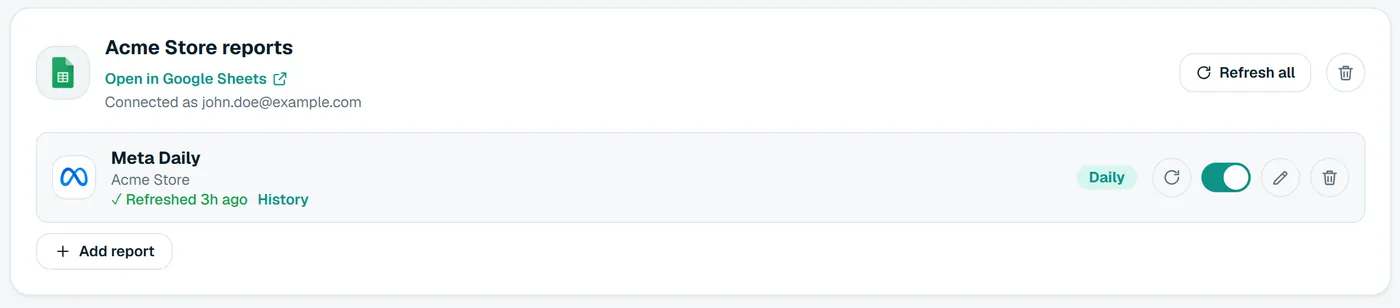
The Spreadsheets page lists every connected sheet and its reports, with the time each one last went through, so you know before your client does.
- Each report: its account, how often, and its tab.
- When it last wrote, and how many rows.
- “Sync now” to fill it right away.
Safe with your sheet
Built for spreadsheets people rely on
Never overwrites your work
A report only writes into its own tab. If a tab with that name already holds other data, Moatrics stops and says so instead of writing over it.
No duplicates
A period that's already in the tab is updated in place, so running the report twice, or a “Sync now” after the morning run, never adds the same rows again.
Only finished periods
Today, this week and this month are still moving, so they wait. A client never sees a figure that quietly changes under them.
Told if it fails
Each report shows when it last went through. If Google refuses a write, the report says why and the Spreadsheets page counts it.
Questions
About Sheets reports
Bring your brands into one dashboard
Moatrics is in early access for brands and agencies. Tell us how many brands you run and which platforms you use, and we'll set you up.